Where to find available tasks
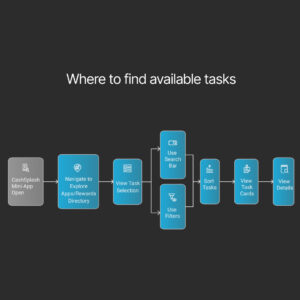
When you open the CashSplash mini-app via @CashSplashAppBot in Telegram, go to the “Explore Apps” or “Rewards Directory” section. Here you’ll find a selection of tasks tailored to your country and device (Android, iOS, or mini-app). The interface resembles an app store: you’ll see icons, reward amounts, and categories such as Games, Finance, Education, and more.
You can use filters to sort tasks by category, reward size, app type, or popularity. A search bar is also available. Each task is displayed as a card with its name, type (App Store or mini-app), expected Stars reward, and a button to view details.
How to complete tasks correctly (iOS / Android / mini-apps)
Each task comes with clear instructions. Here’s a step-by-step guide:
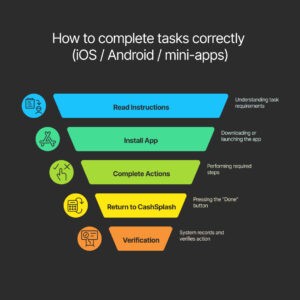
- Open the task and carefully read what needs to be done. It usually involves installing an app, registering, completing a level, or performing an action in the app.
- Follow the link to install the app or launch the mini-app.
- Complete all required actions exactly as described:
- iOS: usually requires installing and using the app for a limited time.
- Android: may include extra steps like opening the app daily.
- Mini-apps: actions are done directly within Telegram.
- Return to CashSplash and press the “Done” button.
- The system automatically records your action — this means when you click the task link, a unique digital identifier (click ID) is generated for you. It tracks whether you actually installed the app or completed the task. Verification platforms like AppsFlyer or Adjust confirm the action by receiving a signal from the app once it’s completed. Only then are Stars credited to your account. This is a fully automated and secure process that eliminates errors and fraud.
How many Stars can different actions earn
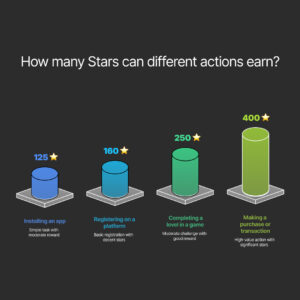
The reward depends on the complexity of the task and its value to the partner. Examples:
- Installing an app: 100–150 Stars
- Registering on a platform: 120–200 Stars
- Completing a level in a game: 200–300 Stars
- Making a purchase or transaction: 300–500+ Stars
You’ll see the estimated number of Stars before you begin, along with the equivalent in your local currency (e.g., 150 Stars ≈ ₹180).
Task statuses: pending / approved / rejected — what they mean
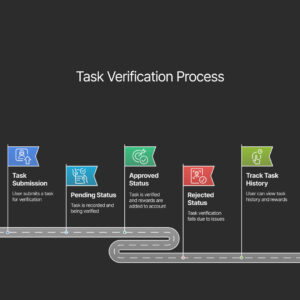
Each task goes through a verification process:
- Pending: your action has been recorded and is being verified. This usually takes a few minutes up to 24 hours.
- Approved: the task was successfully completed and verified. Stars have been added to your account.
- Rejected: the system couldn’t verify the task. Possible reasons include missed steps, VPN usage, or repeating the same task. Always follow instructions closely and avoid suspicious actions.
To track your task history and reward status, go to the “My Account” section. There you can see all completed tasks, their statuses, and your total earnings in Stars.